D-Link's Aquila Pro AI R95 Ships Tri-Band Wi-Fi 7 at 9.5 Gbps for $255, Undercutting ASUS and Netgear
D-Link Aquila Pro AI R95: tri-band Wi-Fi 7 BE9500 router with 9.5 Gbps combined throughput, 2.5 GbE WAN + 3× 2.5 GbE LAN, at $254.99 (half the premium tier).
What it is
D-Link Aquila Pro AI R95 is a tri-band Wi-Fi 7 smart router priced at $254.99 / £180. TechRadar's review calls it "high-speed Wi-Fi 7 at a competitive price." Available on Amazon, Walmart, and D-Link direct.
What's interesting
Price-to-spec is where the R95 pushes the category. TechRadar confirms BE9500 tri-band Wi-Fi 7 performance with 320 MHz channels and combined throughput up to 9.5 Gbps across 2.4 GHz, 5 GHz, and 6 GHz bands. Competitors at this capability tier, ASUS RT-BE96U at $599+, TP-Link Archer BE800 at $549, Netgear Nighthawk RS700S at $699, sit roughly twice the price. The R95 delivers equivalent throughput at $254.99.
Connectivity is current-generation for non-10-GbE households. D-Link's product page documents a 2.5 GbE WAN port paired with three 2.5 GbE LAN ports. For households with multi-gig broadband (1.5 to 2.5 Gbps) and a growing mesh of 2.5 GbE-capable devices, this matches the realistic bandwidth need. The R95 stops short of 10 GbE, which is where the flagship-tier routers justify their price premium for the small cohort of users with 10 GbE NAS devices or fiber plans above 2.5 Gbps.
AQUILA PRO app management is pitched as the value-add. D-Link's overview page describes device zone segmentation (separate performance, privacy, control), guest Wi-Fi management, parental controls, and unknown-connection blocking all from the single app. Basic Tutorials' launch coverage calls out the smart-router posture as a step up from D-Link's prior generation.
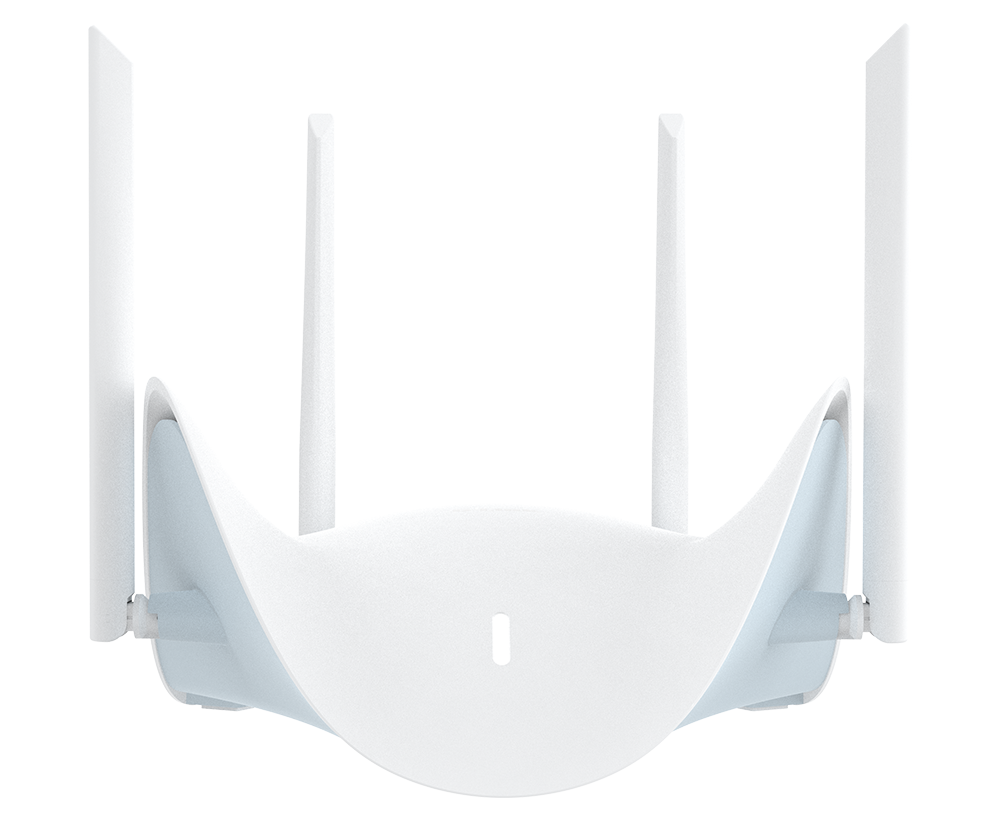
Design-wise, the Sculptured-Wing form factor with four precision-tuned antennas positions the R95 as something users might actually want visible in a living room rather than hiding in a closet. Gaming Debugged's household review validated the actual performance in a multi-device home with streaming, gaming, and video-call loads.
The competitive cohort also includes the D-Link R36 BE3600 (the mid-range Wi-Fi 7 step-down at similar architecture per D-Link's R36 page) and the enterprise-leaning SHI listing per SHI's product catalog. For home users the R95 hits the value sweet spot.
What's missing or unverified
App maturity is the mildest flag. AQUILA PRO AI is relatively new as a product family, and prior D-Link apps have been serviceable rather than class-leading. Ecosystem polish for advanced features (QoS tuning, detailed per-device analytics, firmware update cadence) needs multi-month validation.
No 10 GbE port means multi-gig plus is the ceiling. Households with 10 GbE internal NAS requirements or nascent 10 Gbps fiber plans will outgrow the R95 within 2-3 years. For those buyers, the ASUS or Netgear flagships make more sense despite the price premium.
Manuals.plus video overview shows the R95 alongside the M95 Mesh kit; users who need whole-home mesh rather than a single router should compare the two configurations carefully, the single-router R95 is what this review covers.
Who it's for
Buy the R95 if your household has multi-gig broadband (1 to 2.5 Gbps), you need Wi-Fi 7 for current and future devices, and you want to avoid the $500-$700 premium tier. Renters, apartment dwellers, and homes without 10 GbE infrastructure are the specific fit. Pass if you need 10 GbE WAN or LAN for specialized use cases, if your Wi-Fi footprint requires mesh from day one (buy the M95 Mesh kit), or if you prefer pfSense or Ubiquiti ecosystems where router and app functionality are more mature.
Verdict
72/100. The D-Link Aquila Pro AI R95 compresses flagship-tier Wi-Fi 7 capability into a $255 price point that undercuts ASUS, TP-Link, and Netgear by roughly half. Buy it if your bandwidth and home-network needs match the multi-gig-plus Wi-Fi-7 profile; step up only if 10 GbE is non-negotiable.
Setup and app experience
The AQUILA PRO app handles first-time setup in under ten minutes for most users per the D-Link product page. Scan the QR code, the app walks through ISP detection, Wi-Fi name and password configuration, firmware check, and the initial zone setup. For users coming from an older D-Link or a generic ISP router, the transition is frictionless. The app's device dashboard then surfaces per-device bandwidth, connection type (2.4 / 5 / 6 GHz), and ping latency. Zone segmentation lets parents carve a kids zone with time limits and content filters, a gaming zone prioritised for low latency, and a work-from-home zone with QoS preference for video calls. Those capabilities are common in enterprise gear but unusually clean in a home router at this price tier.
This article was written by Dev, ProDrop’s Builder desk. It was fact-checked with a confidence score of 93%.
More in Networking

ProDrop earns commission from purchases through affiliate links. Read the full disclosure.
Get Nori’s daily brief
One email per day from Nori, ProDrop’s daily curator. Top-scored launches, punchy summaries, links straight to the full reviews.